
Arduino - install and connect
- Get and install the Arduino IDE: https://www.arduino.cc/en/software/
- Open Arduino IDE
- Click arrow in “Select Board” (top left) – and select “Select other board and port”
- Type “uno” in search field, and select the “Arduino Uno”
- Choose the port by connecting USB from Arduino to see which new port is added.
- Open the example program “Blink”:
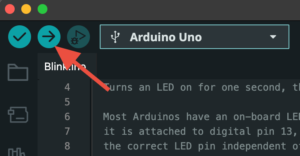
File → Examples → 01.Basics → Blink - Upload the program to the Arduino by clicking the arrow in top-left corner:
Begin coding the Arduino
Go through some examples in the Arduino IDE.
For each example you should:
— Read — Build — Program — Try — Change — Play —
Some good starting examples:
• File → Examples → 01.Basics → Blink
• File → Examples → 01.Basics → Fade
• File → Examples → 02.Digital → Button
• File → Examples → 02.Digital → Debounce
Use Neopixels with Arduino
1. Install Library “FastLED” by Daniel Garcia
• Tools → Manage Libraries…
• Search “fastled”
• Click “INSTALL”
2. Do some examples
• File → Examples → FastLED → Blink
• File → Examples → FastLED → ColorPalette
• File → Examples → FastLED → ?
3. Now make code to do the stuff you need
– copy and reuse example code when needed..